
Our pick for recorded video is VanityFilter, and we make it, so weigh that accordingly. It retouches skin on your own Windows PC or Apple Silicon Mac before the edit, and it costs $49, currently on sale for $29.95, once. For photos, use Photoshop’s Skin Smoothing filter or Portraiture. For live calls, start with the touch-up in your meeting app, then move to VanityCam, also ours, when you want one look in every app.


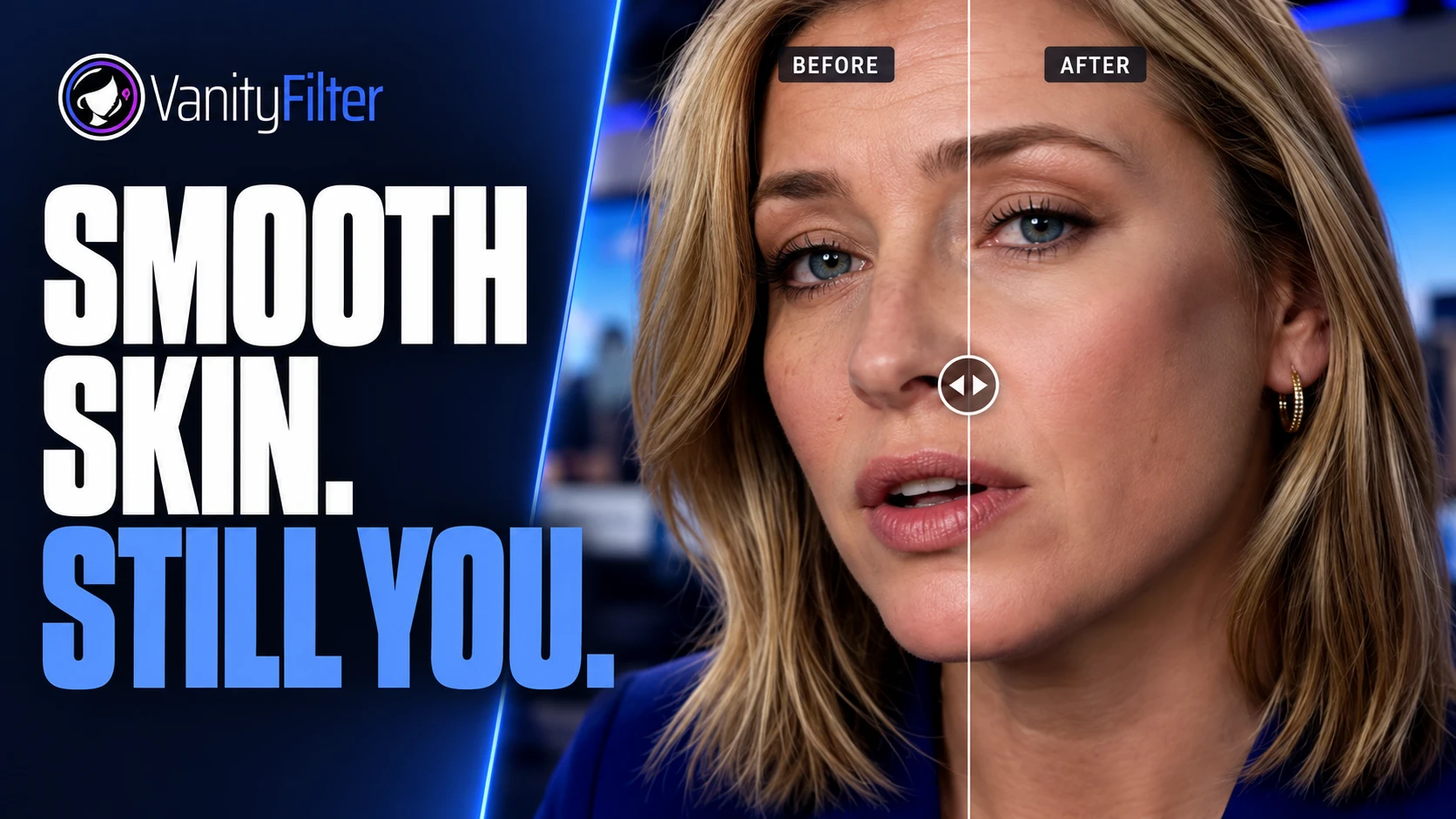
The same interview frame before and after processing in VanityFilter 3.1.5, cropped identically. Drag across her forehead: the lines and fine texture soften a lot at these settings, while her eyes, brows and hair keep their detail. One frame can’t show how a clip holds up in motion, and this is not a test against any other product on this page.
The picks at a glance
| Tool | Best job | Cost | Where it stops |
|---|---|---|---|
| VanityFilter (ours) | Recorded video before the edit, including batches. Windows and Apple Silicon Mac. | $29.95 once on sale, regularly $49. $9.95 for a 30-day demo. | The look is fixed in the export. No photos, no live video, not a plugin. |
| VanityCam (ours) | Live calls and streams on Windows 11, in any app with a camera picker | Free with a visible mark. $19.95 once removes it. | Windows 11 only. No recorded files. |
| Zoom, Teams and Meet touch-ups | A quick softening on a call | A setting in the app you already use | Each one works only in its own app. |
| Beauty Box Video | Video inside Premiere Pro, After Effects, Final Cut Pro, Avid or DaVinci Resolve | $199 for one host app | The effect has to render in your project. |
| Portraiture Video | Video inside Premiere Pro, After Effects, Final Cut Pro or DaVinci Resolve | $249.95 for one editor, with a free trial | The effect runs in your project. Windows 11 or macOS 15 and later. |
| DaVinci Resolve Studio | Shots you are already grading in Resolve | $236 on sale (was $295) on Blackmagic’s Studio page | The face tools are listed among Studio’s added effects. |
| Photoshop Skin Smoothing | One portrait photo at a time | From US$22.99 a month on an annual plan, with a 7-day trial | Adobe’s help covers portrait photos, not moving faces. |
| Portraiture | A whole shoot of portrait photos | $249.95 for Photoshop or Lightroom Classic, $299.95 for both, with a free trial | A photo plugin. The video version is sold separately. |
Start with the job
A photo is one image, and nobody minds if you spend ten minutes on it. A recorded clip at 30 frames per second is 1,800 images a minute, each with the face in a new place, but the software can take its time. A live call has the same frame count and about 33 milliseconds to finish each one. Those are different problems, so a tool that’s good at one often doesn’t attempt the others. VanityFilter skips photos and live video entirely. A meeting touch-up does nothing for a file on your drive.
Recorded video: VanityFilter, or a plugin if the effect has to stay editable
VanityFilter detects up to five faces per frame, including some turned and profile heads, and builds a skin mask for each one across the face, forehead and neck. It smooths inside that mask, so eyes, lips, hair and clothing stay as shot, and the mask is stabilized over time so it doesn’t jump between frames. You check the mask in the preview, then export a new H.264 MP4 or ProRes 422 HQ MOV and open it in your editor. Your footage stays on your computer; activation and license checks need an internet connection. The license is one-time, for one person on two active computers. The features page lists every control, and See it work has real processed clips.
The look is fixed in the export, so changing your mind means processing the source again. One set of settings applies to every selected face, so giving two people different treatment takes separate exports. It doesn’t replace Premiere Pro or Resolve, and variable-frame-rate footage should be converted to a constant frame rate first. It also takes real time: in our batch workflow test, 75 seconds of 1920x1088 footage took just under 5 minutes at the Standard preset on a Core i7-13700K with an RTX 3080, using the 3.1.5 command-line tool, about four times the footage length.
Choose a plugin when the treatment has to stay adjustable inside the project, because you know the note is coming after the picture lock. Beauty Box Video automatically identifies skin tones and masks to them. You apply it, let it analyze the footage and let it render, and the store lists it at $199 for one host app. Portraiture Video advertises AI face tracking, plus shine removal and fill light, at $249.95 per editor. If you already grade in Resolve, Resolve Studio lists face and beauty tools for retouching among its extra effects, at $236 on sale, and our Resolve guide compares them with VanityFilter. We haven’t run an output test against any of them. Our Windows comparison and plugin comparison go through the details.
On a phone
VanityFilter has no phone version. Facetune handles selfie video in the Facetune app, with makeup and reshaping tools and a 7-day free trial. If you landed here wanting Facetune on a computer, our Facetune on PC guide sorts out what works.
Photos: Photoshop for one image, Portraiture for a shoot
This job is outside VanityFilter’s lane, since it processes video files. For one portrait, Adobe’s Skin Smoothing neural filter has Blur and Smoothing sliders and works best on forward-facing portraits. Adobe’s plans page lists Photoshop at US$22.99 a month on an annual plan, so it makes the most sense if you already pay for it.
For a whole shoot, Imagenomic’s Portraiture works in Photoshop, Lightroom Classic and Affinity, and its Uniformity feature is pitched at keeping results consistent across images. Our Photoshop skin smoothing guide covers both, along with frequency separation by hand.
Live calls and streams: your app’s touch-up, then VanityCam
Try what you already have. Zoom has Touch up my appearance with a slider, Teams has Soft focus, and Google Meet has Portrait touch-up. Zoom notes that an admin can turn off features on a work account, and Google says some Meet touch-up features are limited to certain editions. Streamers get less help: the OBS filters guide doesn’t list a skin filter, and our OBS guide covers the routes around that.
VanityCam is our live option, and the same disclosure applies. It sits between your webcam and your video app as a camera, so one look follows you into Zoom, Teams, Meet, Discord and OBS. It smooths up to five faces on your graphics card and uploads nothing. It’s free with a small visible mark, including for public or commercial streams, and $19.95 once removes the mark. It needs Windows 11. If you want both apps, VanitySuite is $49.95 for one key.
A live filter ends up in whatever records it. If the recording matters more than the call, keep the filter light and treat the file afterward, as our guide to Zoom, Teams and Meet recordings explains.
Which one to buy
- For talking heads, interviews or a backlog of recorded clips, buy VanityFilter. Start with the $9.95 30-day demo license, which has every feature and clean exports, and run your hardest clip through it.
- For a treatment you’ll revise inside the project, use a plugin. If you already own Resolve Studio or Beauty Box, try that first and spend nothing.
- For live video only, try your meeting app’s touch-up, then VanityCam when you want the same look across apps.
- For photos only, use Photoshop if you already subscribe and Portraiture if you retouch whole shoots.
- On a budget of zero, the app touch-ups and VanityCam with its mark cover live video. For files, read what free really costs first.
Whatever you pick, test it on two people, a head turn and mixed light, then watch the result play. A retouch can look right on every still and still crawl in motion, which is what our temporal stability article is about.
Frequently asked questions
What is the best skin smoothing software?
It depends on the job. For recorded video, we recommend VanityFilter, our own app: a local skin pass on Windows or an Apple Silicon Mac for $29.95 once at the current sale price. For photos, use Photoshop’s Skin Smoothing filter or Portraiture. For live calls, use the touch-up in your meeting app, or VanityCam, also ours, on Windows 11.
Is VanityFilter a plugin?
No. VanityFilter is a separate app that writes corrected video files, and you open those files in any editor. If the effect has to stay adjustable inside your Premiere Pro or DaVinci Resolve project, a plugin such as Beauty Box Video or Portraiture Video fits that job better.
Can VanityFilter retouch photos or a live webcam?
No. VanityFilter processes recorded video files. Our separate app, VanityCam, smooths skin on a live webcam on Windows 11. For photos, use a photo tool such as Photoshop’s Skin Smoothing filter or Portraiture.
Is there free skin smoothing software?
For live calls, yes. Zoom, Microsoft Teams and Google Meet each document a touch-up setting, and VanityCam is free with a visible mark. For recorded video, free usually comes with limits. Blackmagic lists its face and beauty tools among the added effects in DaVinci Resolve Studio, the paid version. VanityFilter isn’t free either: its cheapest license is a $9.95 30-day demo.
Does VanityFilter upload my video?
No. VanityFilter processes video on your own computer. License activation and later checks use the internet and send license and device details, but not your video or project content.
VanityFilter runs on 64-bit Windows 10 version 1809 or later, Windows 11 and Apple Silicon Macs on macOS 14 or later. The download page has the details. Get the $9.95 30-day demo and try it on a clip of your own.