
For a single photo, free software does the job: GIMP or Photopea on a computer, Snapseed on a phone. When the face is in a video, our pick is VanityFilter. We make it, so weigh that accordingly. It retouches skin in recorded video on your own Windows PC or Apple Silicon Mac, and it costs $49, currently on sale for $29.95, once. It does not edit photos, so for stills, use the free tools below.


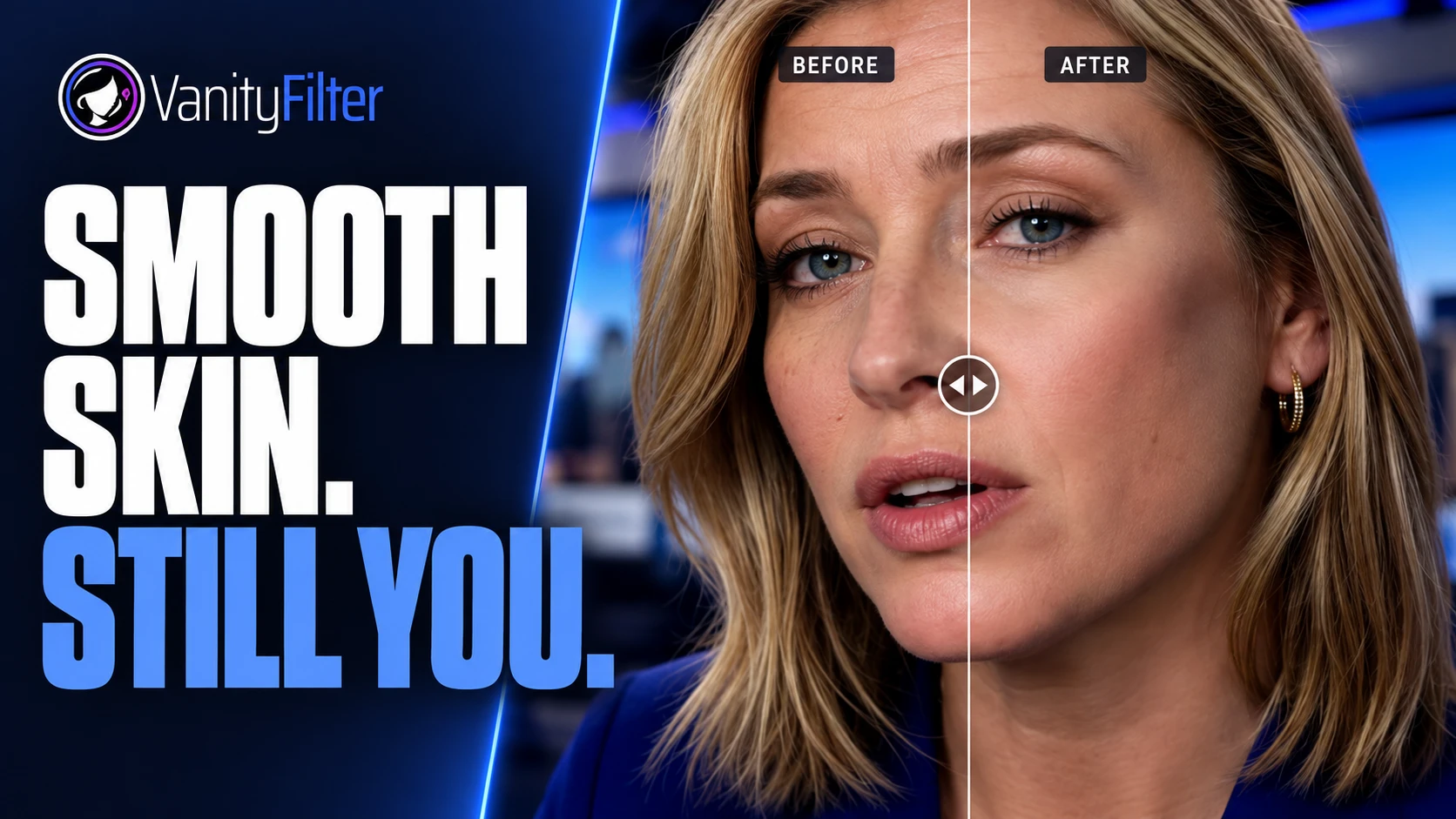
One frame from an interview clip before and after processing in VanityFilter 3.1.5, cropped identically. Drag across her forehead and under her eyes: the lines and fine texture soften, while her brows, lashes, hair and sweater keep their detail. This is a video frame, not a photo edit, and it is not a test against any of the photo tools on this page.
The free and trial options at a glance
| Tool | Runs on | Skin smoothing | Cost | Where it stops |
|---|---|---|---|---|
| VanityFilter (ours) | Windows and Apple Silicon Mac | Automatic skin mask for up to five faces per frame in recorded video | $29.95 once on sale, regularly $49. $9.95 for a 14-day demo. | Video files only. No photos, and not free. |
| GIMP | Windows, macOS and Linux | Wavelet decompose splits the image into detail layers you retouch by hand | Free and open source | Manual layer work with a learning curve |
| Photopea | A web browser, processing on your device | Spot Healing Brush, Healing Brush, blur filters and masks | Free | You build the smoothing yourself |
| Snapseed | iPhone, iPad and Android | A Skin Smoothing control in the Face tool | Free, with no ads, purchases or watermarks per its store listing | A phone and tablet app |
| Photoshop Skin Smoothing | Photoshop on desktop | A neural filter with Blur and Smoothing sliders | 7-day free trial, then US$22.99 a month on an annual plan billed monthly | Adobe says it works best on forward-facing portraits |
| Portraiture | Photoshop, Lightroom Classic or Affinity on Windows 11 or macOS 15 and later | AI skin smoothing and masking | Free trial, then $249.95 once | A plugin, so it needs a host app |
The free photo tools, one by one
GIMP: free, powerful, all by hand
GIMP is a free, open source image editor for Windows, macOS and Linux. Its manual calls Wavelet decompose a great filter for skin smoothing and for removing blemishes and wrinkles. You find it under Filters, Enhance, Wavelet decompose. It splits the photo into layers called scales, from fine detail down to a residual layer that holds the overall color and contrast. Painting a scale with neutral gray erases the detail on it, so you soften skin by working on the fine scales and leave the eyes and hair alone. It is the same idea as frequency separation, and it takes practice.
Photopea: Photoshop-style tools in a browser
Photopea is a free editor that opens in a web browser and reads PSD files. Its own introduction says it runs on your device and does not upload your files, and that it keeps working offline once loaded. That matters if the photo belongs to a client. For skin, its Spot Healing Brush removes spots in one stroke, and layers, masks and blur filters let you build a softening layer by hand.
Snapseed: one slider on your phone
Snapseed is Google’s photo editor for iPhone, iPad and Android, and its listing promises no subscriptions, purchases, ads or watermarks. Google’s help page for the Face tool describes Skin Smoothing as smoothing skin texture while keeping a natural look. You swipe up or down to pick it and sideways to set the strength. It is the quickest of the three.
Trials: Photoshop and Portraiture
Adobe’s Skin Smoothing neural filter has Blur and Smoothing sliders. Adobe says it works best on forward-facing portraits and may give unexpected results behind glasses or at extreme angles. Adobe’s plans page offers a 7-day free trial, then US$22.99 a month on an annual plan billed monthly, so the trial is free only if you cancel in time. Imagenomic’s Portraiture plugin also has a free trial and then costs $249.95 once for Photoshop or Lightroom Classic. Imagenomic sells Portraiture Video separately for video editors. Our Photoshop skin smoothing guide covers both in more depth.
How to judge a free photo tool
Zoom to 100 percent on the cheek and forehead. Pores and fine texture should still be there after the edit. If the skin looks like plastic, lower the strength or work on a duplicate layer at reduced opacity. Then check where the photo goes. A browser editor that processes on your device is a different deal from one that sends your file to a server, and the privacy policy tells you which. Last, export at full size and compare the pixel dimensions with the original before you spend an hour on a portrait.
What changes when the face is in a video
A photo is one image. A minute of video at 30 frames per second is 1,800 of them, with the face in a slightly different place in each. Retouching frames one at a time in a photo or selfie editor isn’t realistic, and a retouch that lands a little differently on each frame shows up as flicker when the clip plays. Our article on temporal stability explains why that happens.
That is the job VanityFilter does. It detects up to five faces per frame, including some turned and profile heads, builds a skin mask for each one across the face, forehead and neck, and keeps the mask steady over time so it doesn’t jump between frames. Eyes, lips, hair and clothing stay as shot. You check the result in the preview, then export an H.264 MP4 or ProRes 422 HQ MOV, plus an optional grayscale mask matte for your editor. The video is processed on your computer; activation and license checks use the internet but send no video. The features page lists every control, and See it work has real processed clips.
It has limits. VanityFilter doesn’t retouch photos or live video, and it is not a plugin, so the look is fixed in the export and changing it means processing the source again. One set of settings applies to every selected face. Variable-frame-rate footage should be converted to a constant frame rate first.
Which one to use
- For one photo on your phone, use Snapseed.
- For a photo on your computer when you want control, use GIMP or Photopea. Photopea is the easier start if you know Photoshop.
- If you already pay for Photoshop, use its Skin Smoothing filter. For a whole shoot of portraits, try the Portraiture trial.
- For a face in recorded video, use VanityFilter. Start with the $9.95 14-day demo license and run your hardest clip through it.
- For free ways to smooth skin in video, read what free really costs. For a wider view by job, see our picks for photos, video and live calls.
Frequently asked questions
Is there free photo skin smoothing software?
Yes. GIMP and Photopea are free on a computer, and Snapseed is free on iPhone, iPad and Android with a Skin Smoothing control in its Face tool. Photoshop and Portraiture are paid, but both offer a free trial. If the face is in a video rather than a photo, our recommendation is VanityFilter, our own app for recorded video.
Can VanityFilter smooth skin in photos?
No. VanityFilter processes recorded video files on Windows and Apple Silicon Macs. For a still photo, use a photo editor such as GIMP, Photopea, Snapseed or Photoshop.
Is VanityFilter free?
No. The cheapest way to try it is the $9.95 14-day demo license, which has every feature and clean exports. The full license is $49, currently on sale for $29.95, paid once with no subscription.
Do free online photo editors upload my photo?
Some do, so check before you open a client’s photo. Photopea says it runs on your device and does not upload your files. For any other web editor, read its privacy policy first.
Can I use a free photo editor to smooth skin in a video?
Not in any practical way. A minute of video at 30 frames per second is 1,800 frames, and each one would need the same retouch in the same place. A video tool handles the whole clip. VanityFilter, which we make, builds a skin mask for each face, keeps it steady from frame to frame and exports a new video file.
VanityFilter runs on 64-bit Windows 10 version 1809 or later, Windows 11 and Apple Silicon Macs on macOS 14 or later. The download page has the details. Get the $9.95 14-day demo and try it on a clip of your own.