
If you went looking for Magic Bullet Cosmo and came back confused, that is fair. Maxon has moved it. The plugin now sits inside Red Giant as a Color tool, and the standalone purchase people remember is gone from the pricing page. So the question turns into what you are actually buying, and whether you need all of it when a skin pass is the whole job.
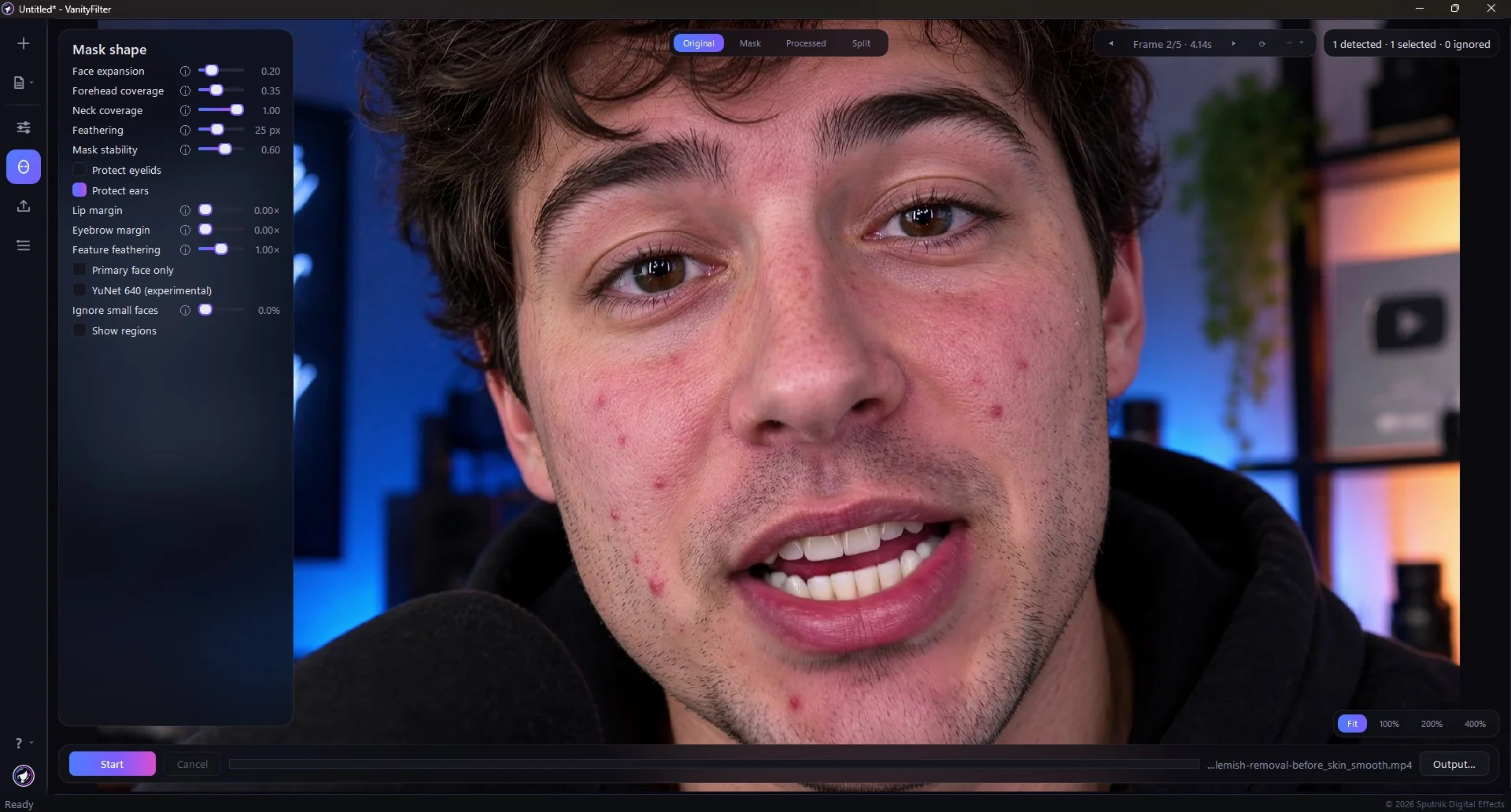
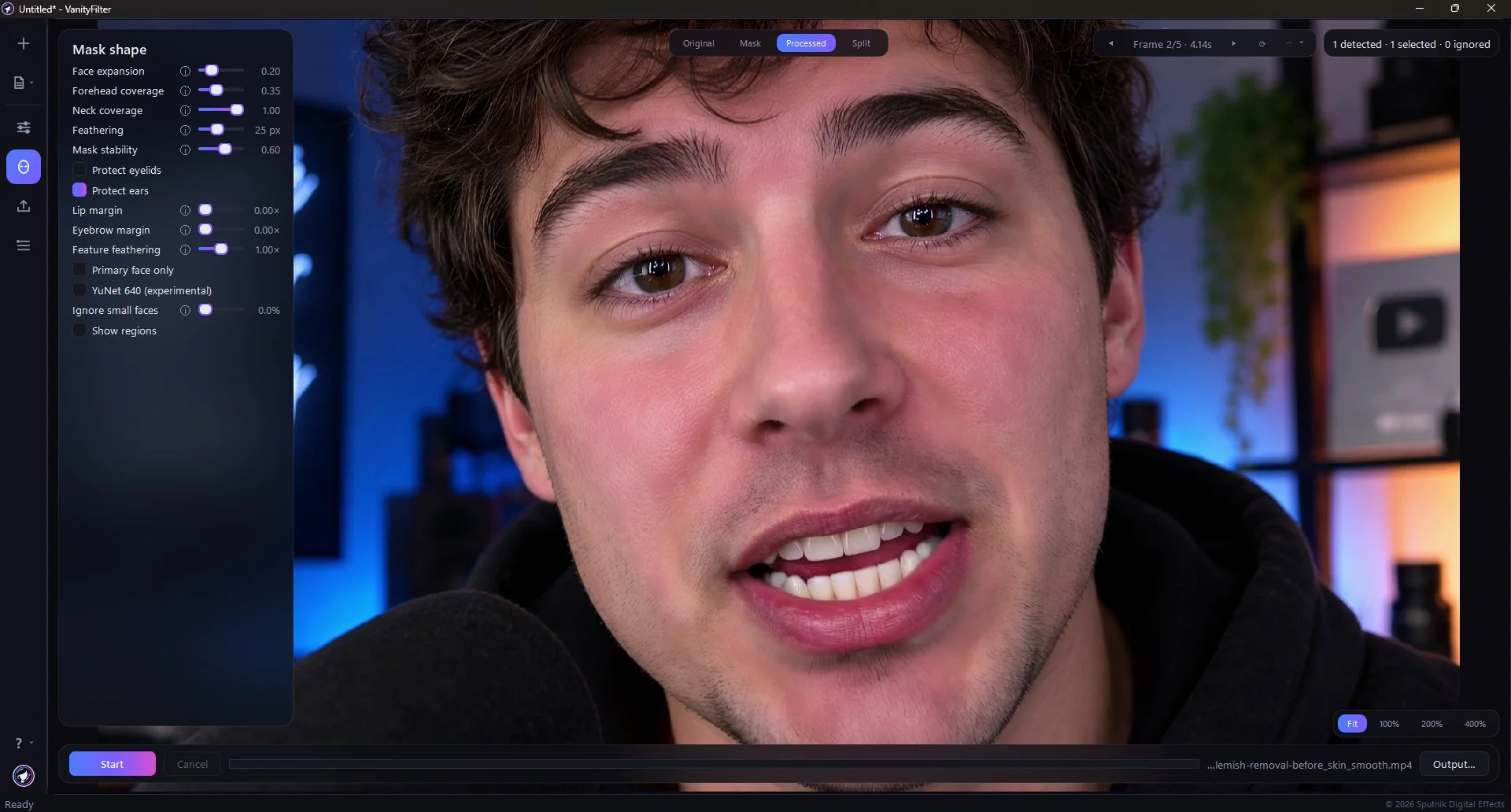
Real footage in VanityFilter 3.1.5, same frame, Original against Processed. The Mask shape panel is left in shot on purpose: lip margin, eyebrow margin and the protect toggles are what hold the treatment off the features. Watch the hair, the hoodie and the lit shelves behind him stay exactly as shot.
The short version: Cosmo is good at what it does and it lives where colorists already work. It also comes with a suite subscription and a per-shot skin sample you supervise. If your whole job is “make the faces in these 40 interview clips look right,” a one-time standalone pass on the files does that without a plugin or a renewal date.
What Cosmo is in 2026, according to Maxon
First the naming, because it trips people up. People search for Magic Bullet Cosmo, but Maxon’s current Cosmo product page calls it Cosmo, files it under Red Giant in the Color category, and marks it “Part of Red Giant” right at the top. Magic Bullet is still a name on that shelf, on Looks, but Cosmo is presented as a Red Giant color tool. So if you searched for a Magic Bullet product and landed somewhere that says Red Giant, you are in the right place.
Maxon describes Cosmo as a plugin that balances skin tones, reduces wrinkles, and removes blemishes. On the Cosmo features list the four things Maxon leads with are worth reading closely:
- Better Results. Advanced blurring algorithms for skin smoothing that Maxon says feels natural and untouched.
- Skin Sample. An eye dropper for skin sampling that, in Maxon’s words, makes it easy to select skin within your shot.
- Refined Visual Feedback. Selection controls that let you see and control the skin selection “so that you can be sure you are editing your subject, not your background.”
- Adobe Multi-Frame Rendering Ready. After Effects can spread previews and renders across CPU cores.
The third bullet is the one to hold onto on a shooting day. Cosmo works by selecting a skin color you point it at, and Maxon ships controls so you can look at that selection and correct it. That is a sensible design for a grading tool, and it is also a per-shot job. Change the wardrobe, the wall, or the lighting and the selection is something you check again.
The pricing picture, checked today
Maxon’s plans and pricing page, as of September 22, 2026, lists six plans for individuals: Maxon One at $1265.00 billed annually, Cinema 4D at $839.00, Red Giant at $639.00, Redshift at $289.00, Universe at $214.00, and ZBrush at $399.00. Cosmo is not one of them, which matches the “Part of Red Giant” label on its own page.
That page also states its prices include the highest potential VAT rate, says your real total shows up in the cart, and offers a region switcher. So $639.00 is the listed annual figure we saw rather than a quote for you. Check your own region before you plan around it.
What you get for it, and why that matters
Red Giant is a large toolkit: particles, lens flares, keying, transitions, Magic Bullet Looks, Universe, Maxon Studio templates. If you use even a third of that, the subscription is doing real work and Cosmo rides along free. If Cosmo is the only reason you opened it, you are renting a workshop to use one tool.
Sampling a color versus finding a person
Both approaches are trying to answer the same question: which pixels are skin. They answer it from opposite ends.
Cosmo starts from color. You sample a skin tone, it works on pixels in that range, and the Selection controls let you confirm the result covers your subject and not the room behind them. When your talent is wearing a tan sweater in front of a wooden bookshelf holding a coffee cup, that selection is doing harder work, and Maxon giving you a selection view is a straight acknowledgement that it is worth looking at.
VanityFilter starts from the person. A face mesh maps each person’s features, a separate fallback detector holds on when a head turns to profile, and person segmentation builds a skin mask per person. Eyes, brows, lips, hair, glasses, jewelry, clothing, and the background sit outside the mask by construction, so there is nothing to sample and nothing to re-sample when the wardrobe changes. Up to five faces per frame, each with their own mask, which is what a two-hander or a panel actually needs.
Neither is magic. A color qualifier gives you precise manual control when you want it. A segmentation mask gives you a repeatable starting point across a folder of clips. You still check the mask overlay on a frame where the person is mid-sentence and gesturing, not on a flattering still from the top of the take.
Timeline plugin or pre-edit pass
Maxon lists Red Giant tools as natively supported in After Effects, Premiere Pro, DaVinci Resolve, Apple Motion, Final Cut Pro, Avid Media Composer, Autograph, and Cinema 4D. Living in the host is the whole point of a plugin, because the effect sits on the clip and you see it in context while you work. The cost is that your timeline now carries the effect. Every preview and every export recomputes it, and that cost grows with clip count and resolution.
A standalone pass moves the work off the timeline entirely. Point VanityFilter at the camera files, let it write corrected files, then cut with footage that is already right. Your NLE goes back to doing cuts and your export is a normal export. The tradeoff is that the correction is written into the file, so changing your mind means going back to the original and exporting again.
Side by side
| Red Giant Cosmo | VanityFilter | |
|---|---|---|
| Where it runs | Plugin inside a supported host | Standalone Windows 10 / 11 app |
| How you buy it | Included in the Red Giant subscription | One-time license, $49 regular, currently $29.95 |
| Listed price | Red Giant $639.00 billed annually, checked 2026-09-22 | $29.95, 1 user, up to 2 machines |
| How skin is selected | Skin Sample eye dropper plus Selection controls | Per-person segmentation, no sampling step |
| Several faces at once | Per instance, per your selection | Up to 5 faces, separate mask each |
| Profile heads | Depends on the selection holding | Dedicated fallback detector |
| Batch a folder | Per clip on the timeline | Built in, plus a command-line tool |
| Mask export | Not offered as a file | Grayscale matte with a settings JSON sidecar |
| Platforms | Windows and macOS hosts | Windows only |
| Works offline | Subscription needs activation | Offline key, processing stays local |
When Cosmo is the right call
Keep it in the host when the host is where the decision lives. You are already paying for Red Giant and using Looks and Universe. You have a hero shot you are grading anyway and you want the skin work to sit in the same stack, adjustable, next to the grade. Your client changes their mind twice a day and you need the slider live under your hand. Also, if you are on macOS, this is not a close call, because VanityFilter is Windows only.
The same logic applies to other in-host tools. Our DaVinci Resolve Face Refinement comparison works through the Resolve version of exactly this decision, and the Beauty Box alternative guide covers the plugin that takes a third approach again.
When the standalone route wins
You have a folder, not a shot. Forty interview clips, or a weekend of event coverage. Batch the folder, check a few frames, move on. This is the case a per-clip plugin makes expensive in time rather than money.
Two or more people in frame. Different complexions, different lighting on each face. Separate masks per person rather than one selection stretched across both.
You only need the skin pass. You are not going to open the other hundred tools. A one-time $29.95 license against a $639.00 annual subscription is not a subtle difference when the skin pass is the entire job.
The footage cannot leave the building. Corporate, legal, medical, education. Offline activation and local processing, with nothing uploaded.
You want the mask, not the correction. Export the grayscale matte and drive your own grade with it. The mask matte guide covers the Premiere and Resolve setups.
Honest limits
VanityFilter is Windows only, so a macOS or Linux shop should stop reading here and use a host plugin. Variable-frame-rate source exports as constant frame rate, which matters if you shoot on a webcam or a phone. Very small or heavily covered faces get skipped for those frames, and the mask fades out rather than popping. Five faces per frame is the ceiling, so a crowd scene is not the use case. And because the correction is written into the output file, revising it means another export from the original.
FAQ
Can you buy Magic Bullet Cosmo on its own?
Not from Maxon’s own plans page. Cosmo is labelled “Part of Red Giant” on its product page, and the plans page we checked on September 22, 2026 lists Red Giant, Cinema 4D, Redshift, Universe, ZBrush and Maxon One. There is no Cosmo line item.
What does Red Giant cost right now?
Maxon’s plans page listed Red Giant at $639.00 billed annually when we checked on September 22, 2026. That page also says its prices include the highest potential VAT rate and that your actual total appears in the cart, so check your own region before you budget from that number.
How does Cosmo decide what counts as skin?
You show it. Maxon describes a Skin Sample eye dropper for selecting skin in the shot, plus Selection controls that let you see and adjust that selection. It is a supervised, color-driven pick, which is why Maxon gives you a way to inspect it per shot.
How is VanityFilter different from a timeline plugin?
VanityFilter never installs into an editor. It is a separate Windows application that reads video files and writes corrected video files, so your timeline never renders the effect. You drop the corrected clips into whatever you already cut in.
Can VanityFilter output something I can use in Premiere Pro?
Yes. It exports H.264 MP4 or ProRes 422 HQ with the original audio, and it can also write a grayscale skin matte you can bring in as a track matte or external matte if you would rather drive your own correction with it.
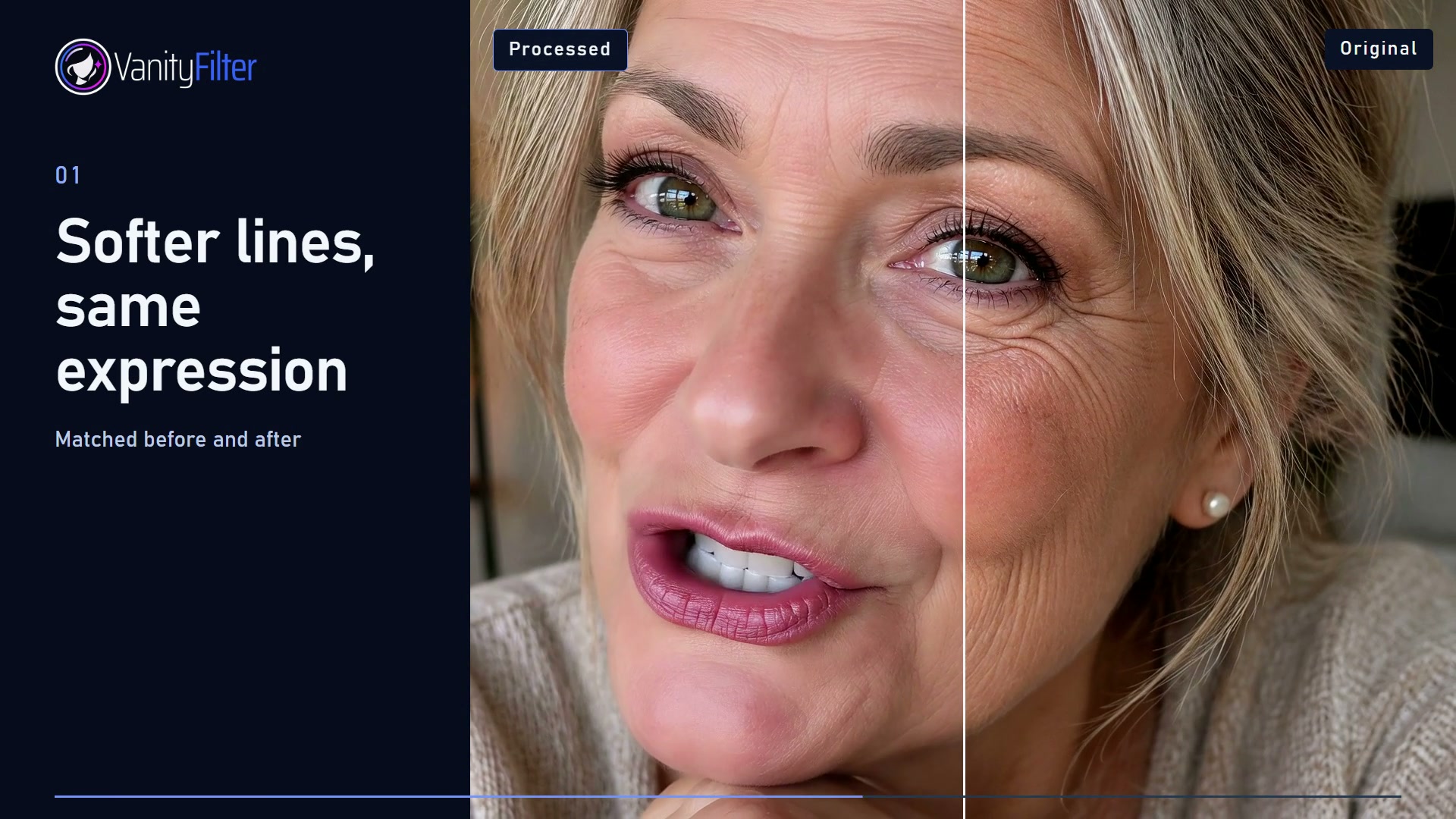
VanityFilter processes video offline on Windows. There is no subscription. See current pricing.